An AI chat that only answers saves nobody any work. The work starts after the answer: reading, retyping, transferring it into the right system. Together with VorFina, we built a chat that takes over this second part. This is what the difference looks like.
In short: A normal AI chat only knows what is in the conversation and answers with text. A chat with tools looks things up in your systems, prepares actions and shows the answer as a table or a card. That saves your team the transferring. And it often saves you the screen you would otherwise have to have built for it.
The story behind the picture
The chat is part of the app for insurance brokers designed by VorFina. We are building it together. From the start, one rule applied that we recommend to everyone: the chat may read on its own. Before writing, it gets a confirmation.
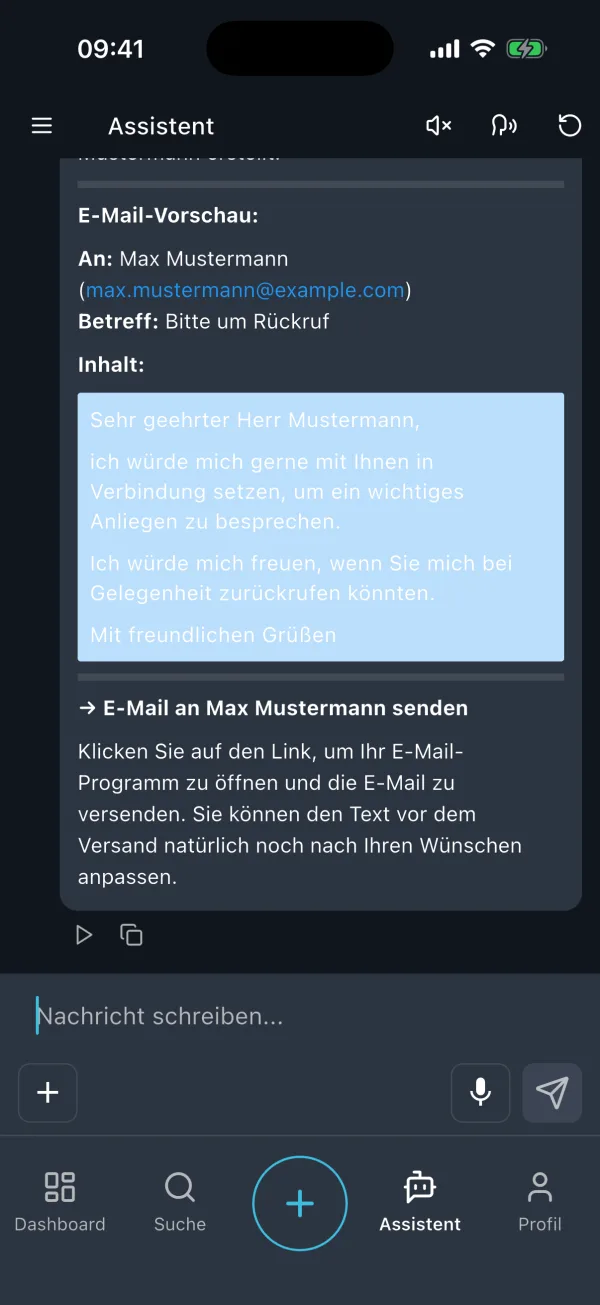
The first version of this confirmation was a text preview with a link to the mail app. There the broker had to read the text again, adjust it and send it himself. That worked, but it was a detour. And a confirmation you cannot read in peace is not a confirmation, but a reflex.
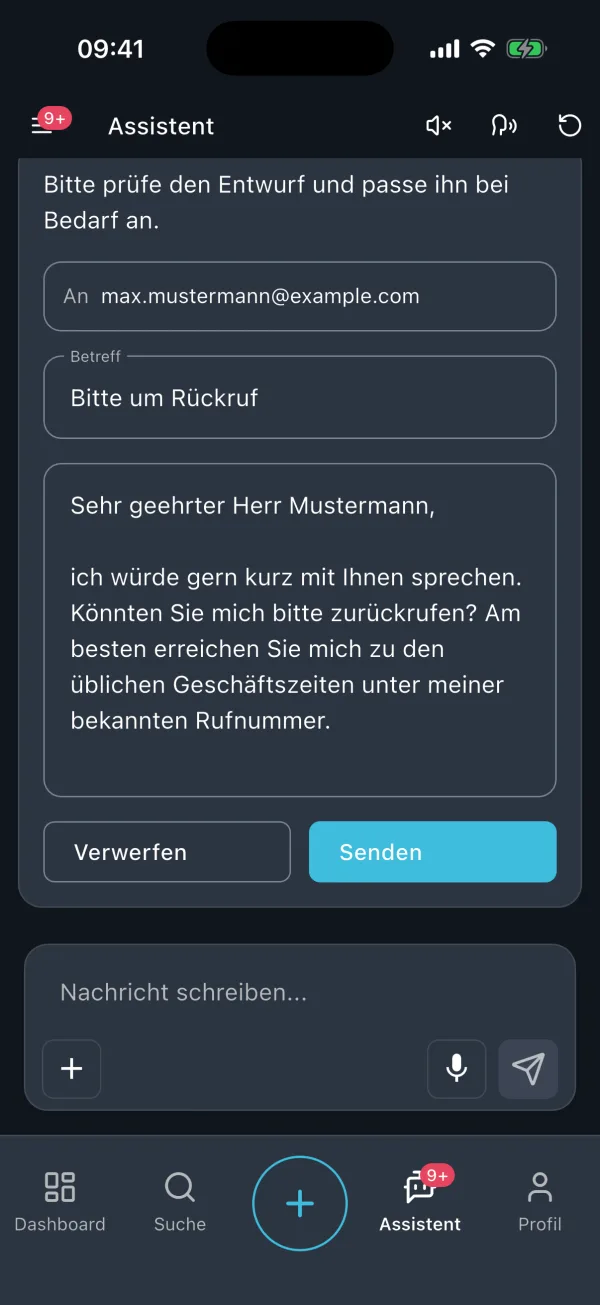
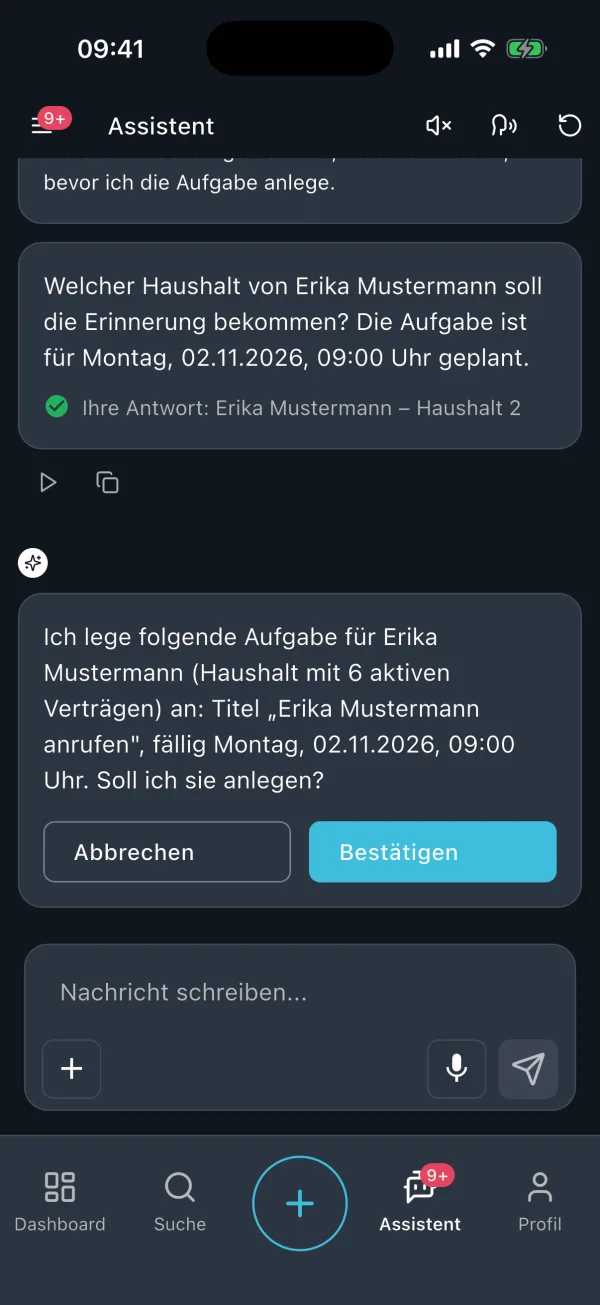
So we replaced the preview with an action card. Recipient, subject and text are in fields you edit directly. Below them, “Discard” and “Send”. The same card asks before a new task: what will be created, when, for whom. Then “Cancel” or “Confirm”.
Since then, approving is a decision, not a test of courage. A wrongly prefilled field stands out in a form. In a paragraph, it gets lost.
What the chat can do today, and what the insurance broker gets out of it
Every capability has a reason, and the reason is never the technology.
- It answers specialist questions from the documents. Products, rates, procedures. The broker gets the answer a colleague would have given, just without waiting.
- It carries out actions after approval. Send an email, create a task, change an address. The broker retypes nothing, and nothing happens that he has not seen.
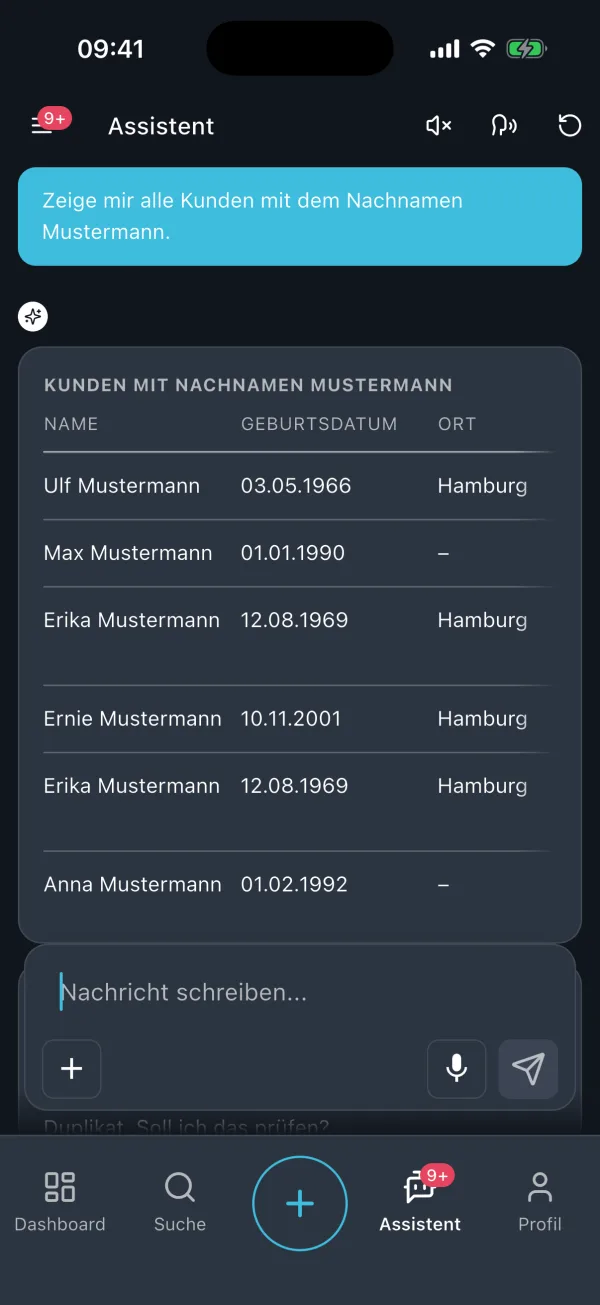
- It answers with building blocks instead of running text. Table, key figure, chart, form, selection, email draft, download. If the broker asks for all customers with a certain last name, a table comes back without him having to order one. Five rows are checked faster than a paragraph with five names in it.
- It asks back instead of guessing. If two customers match the name, it shows a selection. If the date of a task is missing, it shows a small form. Only when everything is there does the confirmation card appear.
- It keeps working in the background. A longer analysis runs while the broker reads a customer file or sits in an appointment. When it is done, the app reports back with a notification.
- Several conversations in parallel, old conversations still there. One conversation for the customer appointment, one for the analysis. Each keeps its context, even next week. Whatever needs an input is marked in the list.
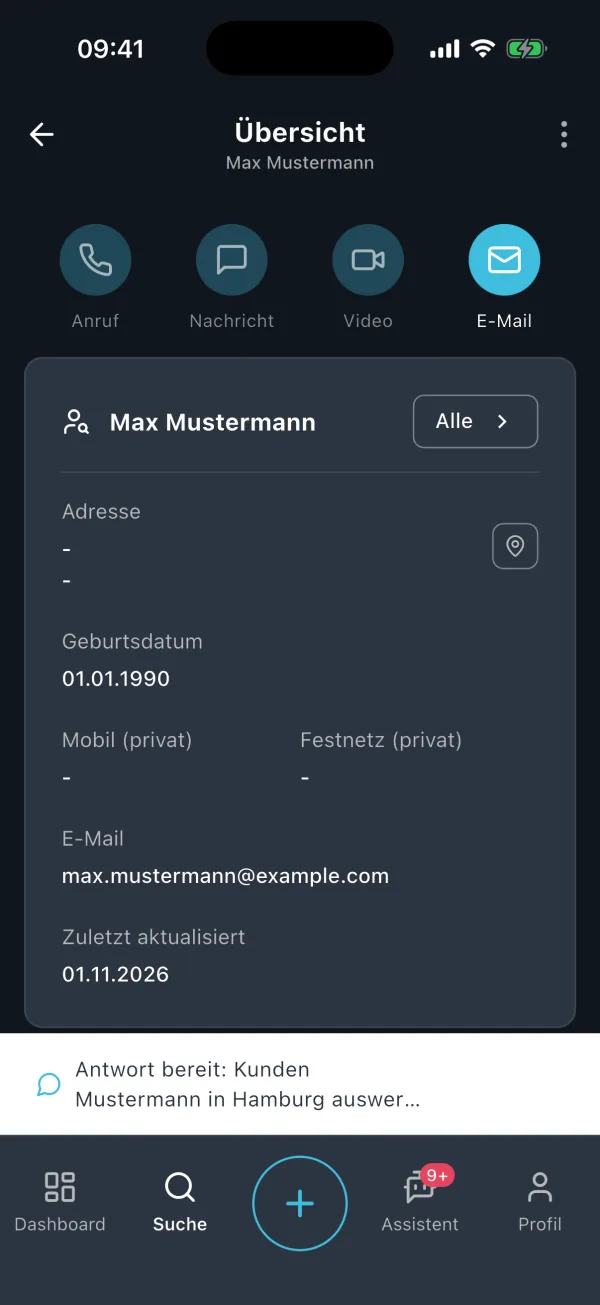
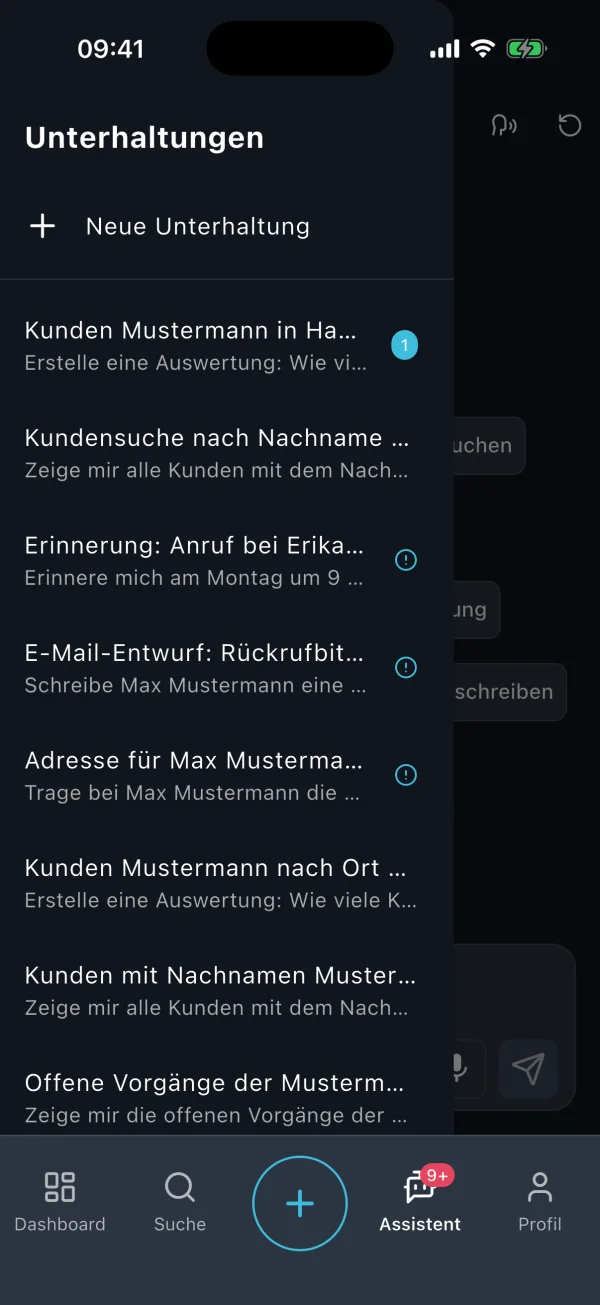
On top of that, voice recording instead of typing and suggestions for frequent requests, so nobody sits in front of an empty field.
Why this is cheaper than a new screen
This is where it gets interesting for you as a client. Every function in an app normally costs a screen: design, form or list, the path to it in the menu, implementation for iPhone and Android, tests, upkeep with every change. That is why only functions that are needed often enough get a screen. Everything else stays a wish on the list.
With tools, the math changes. The building blocks, that is, table, card, form, selection, we built once. After that, a new function only needs a tool: a description of what it does, and the interface behind it, which usually already exists. The analysis of how many customers live in a given city would never have gotten its own screen. In the chat, it is a question.
That does not mean screens disappear. What a broker does constantly stays a screen with a tap on it, because typing a sentence is slower than a tap. The chat covers the long rest: the questions and actions that are individually too rare for a screen and together still cost time.
What is behind it, in two paragraphs
Tools. In technical terms, this is called Tool Use. We give the model a list of tools, each with a short description: “Find customer”, “Create task”, “Send email”. The model decides during the conversation when it needs a tool and fills in the details. It is executed by your system, not by the model. From this follows the most effective boundary you can draw: a tool you do not build, the chat cannot use. That is more reliable than any instruction in the prompt.
Building blocks. This is called Generative UI. The model does not draw an interface freely. The app has a fixed kit of tested building blocks, and the model picks the fitting one and supplies the data for it. The display stays reliable, even though the content changes every time. And the separation between reading and writing is built into the building blocks themselves: reading tools show a table, writing tools show a card with approval. Why this separation matters so much is explained in The Most Expensive AI Errors Are the Ones Nobody Sees.
When the normal chat is perfectly sufficient
A tool chat is not an end in itself. Every tool needs an interface, permissions and tests. For text, the normal chat is enough: drafting emails, summarizing minutes, collecting ideas.
The effort pays off when three things come together:
- The same question is asked again and again.
- The answer lives in a system that can be connected.
- The result is currently transferred by hand from the chat into another system.
And even then, what we described in AI Is the Fallback, Not the First Choice applies: some questions are answered better by a fixed filter in the CRM than by any chat.
You do not have to start with an assistant that can do everything. One reading tool for a question that comes up several times a week, the answer as a table. Only after that a writing tool, with a card. What such a start looks like is described in One Process, One Person, Two Weeks.
What this means for you
If you are wondering whether your team needs more than a normal AI chat, go through these questions:
- Which question does your team ask again and again, whose answer lives in one of your systems?
- Is something currently retyped from the chat or carried over by copy and paste?
- Which tools should only be allowed to read, which would have to change something, and can the human read what they are confirming?
- Which wishes have been on the list for months, because a dedicated screen for them would be too expensive?
- Would the answer be easier to check as a table or a card than as text?
A normal chat answers questions. A chat with tools gets them done, after your approval.
If you would like to know which question in your business deserves the first tool, we look at it together in a first call.